Wednesday, 3 June 2020

OWASP-ZSC: A Shellcode/Obfuscate Customized Code Generating Tool


About OWASP-ZSC
   OWASP ZSC is open source software written in python which lets you generate customized shellcodes and convert scripts to an obfuscated script. This software can be run on Windows/Linux/OSX with Python 2 or 3.

   What is shellcode?: Shellcode is a small codes in Assembly language which could be used as the payload in software exploitation. Other usages are in malwares, bypassing antiviruses, obfuscated codes...

   You can read more about OWASP-ZSC in these link:
Why use OWASP-ZSC?
   Another good reason for obfuscating files or generating shellcode with OWASP-ZSC is that it can be used during your pen-testing. Malicious hackers use these techniques to bypass anti-virus and load malicious files in systems they have hacked using customized shellcode generators. Anti-virus work with signatures in order to identify harmful files. When using very well known encoders such as msfvenom, files generated by this program might be already flagged by Anti-virus programs.

   Our purpose is not to provide a way to bypass anti-virus with malicious intentions, instead, we want to provide pen-testers a way to challenge the security provided by Anti-virus programs and Intrusion Detection systems during a pen test.In this way, they can verify the security just as a black-hat will do.

   According to other shellcode generators same as Metasploit tools and etc, OWASP-ZSC  using new encodes and methods which antiviruses won't detect. OWASP-ZSC encoders are able to generate shell codes with random encodes and that allows you to generate thousands of new dynamic shellcodes with the same job in just a second, that means, you will not get the same code if you use random encodes with same commands, And that make OWASP-ZSC one of the best! During the Google Summer of Code we are working on to generate Windows Shellcode and new obfuscation methods. We are working on the next version that will allow you to generate OSX.

OWASP-ZSC Installation:
   You must install Metasploit and Python 2 or 3 first:
  • For Debian-based distro users: sudo apt install python2 python3 metasploit-framework
  • For Arch Linux based distro users: sudo pacman -S python2 python3 metasploit
  • For Windows users: Download Python and Metasploit here.
   And then, enter these command (If you're Windows user, don't enter sudo):
DISCLAIMER: THIS SOFTWARE WAS CREATED TO CHALLENGE ANTIVIRUS TECHNOLOGY, RESEARCH NEW ENCRYPTION METHODS, AND PROTECT SENSITIVE OPEN SOURCE FILES WHICH INCLUDE IMPORTANT DATA. CONTRIBUTORS AND OWASP FOUNDATION WILL NOT BE RESPONSIBLE FOR ANY ILLEGAL USAGE.

An example of OWASP-ZSC

Related word


  1. Pentester Academy
  2. Pentesting Tools
  3. Hacking Growth
  4. Pentest Guide
  5. Hacker Lab
  6. Pentestmonkey Sql Injection
  7. Pentest Guide
  8. Hacking 3Ds
  9. Pentest Report Generator
  10. Pentest Linux
  11. Hacking Growth
  12. Hacking Browser
  13. Hacking Apps
  14. Pentest Guide
  15. Hacker Box
  16. Pentest Uk

Top 10 Most Popular Ethical Hacking Tools (2019 Ranking)

     Top 10 powerful Hacking  Tools in 2019.       

If hacking is performed to identify the potential threats to a computer or network then it will be an ethical hacking.

Ethical hacking is also called penetration testing, intrusion testing, and red teaming.

Hacking is the process of gaining access to a computer system with the intention of fraud, data stealing, and privacy invasion etc., by identifying its weaknesses.

Ethical Hackers:

A person who performs the hacking activities is called a hacker.

There are six types of hackers:

  • The Ethical Hacker (White hat)
  • Cracker
  • Grey hat
  • Script kiddies
  • Hacktivist
  • Phreaker

A security professional who uses his/her hacking skills for defensive purposes is called an ethical hacker. To strengthen the security, ethical hackers use their skills to find vulnerabilities, document them, and suggest the ways to rectify them.

Companies that provide online services or those which are connected to the internet, must perform penetration testing by ethical hackers. Penetration testing is another name of ethical hacking. It can be performed manually or through an automation tool.

Ethical hackers work as an information security expert. They try to break the security of a computer system, network, or applications. They identify the weak points and based on that, they give advice or suggestions to strengthen the security.

Programming languages that are used for hacking include PHP, SQL, Python, Ruby, Bash, Perl, C, C++, Java, VBScript, Visual Basic, C Sharp, JavaScript, and HTML.

Few Hacking Certifications include:

  1. CEH
  2. GIAC
  3. OSCP
  4. CREST

Let's Explore!!

#1) Nmap

Nmap

Price: Free

Description:

Nmap is a security scanner, port scanner, as well as a network exploration tool. It is an open source software and is available for free.

It supports cross-platform. It can be used for network inventory, managing service upgrade schedules, and for monitoring host & service uptime. It can work for a single host as well as large networks. It provides binary packages for Linux, Windows, and Mac OS X.

Features: 

  • Nmap suite has:
    • Data transfer, redirection, and debugging tool(Ncat),
    • Scan results comparing utility(Ndiff),
    • Packet generation and response analysis tool (Nping),
    • GUI and Results viewer (Nping)
  • Using raw IP packets it can determine:
    • The available hosts on the network.
    • Their services offered by these available hosts.
    • Their OS.
    • Packet filters they are using.
    • And many other characteristics.

Best for: Nmap is best for scanning network. It is easy to use and fast as well.

Website: Nmap

******************

#2) Netsparker

Netsparker Vulnerability-Assessments-and-Penetration-Tests

Netsparker is a dead accurate ethical hacking tool, that mimics a hacker's moves to identify vulnerabilities such as SQL Injection and Cross-site Scripting in web applications and web APIs. 
 
Netsparker uniquely verifies the identified vulnerabilities proving they are real and not false positives, so you do not need to waste hours manually verifying the identified vulnerabilities once a scan is finished.
 
It is available as a Windows software and an online service.

******************

#3) Acunetix 

Acunetix Dashboard

Acunetix is a fully automated ethical hacking tool that detects and reports on over 4500 web application vulnerabilities including all variants of SQL Injection and XSS.

The Acunetix crawler fully supports HTML5 and JavaScript and Single-page applications, allowing auditing of complex, authenticated applications.

It bakes in advanced Vulnerability Management features right-into its core, prioritizing risks based on data through a single, consolidated view, and integrating the scanner's results into other tools and platforms.

=> Visit Acunetix Official Website

******************

#4) Metasploit

Metasploit

Price: Metasploit Framework is an open source tool and it can be downloaded for free. Metasploit Pro is a commercial product. Its free trial is available for 14 days. Contact the company to know more about its pricing details.

Description:


It is the software for penetration testing. Using Metasploit Framework, you can develop and execute exploit code against a remote machine. It supports cross-platform.

Features: 

  • It is useful for knowing about security vulnerabilities.
  • Helps in penetration testing.
  • Helps in IDS signature development.
  • You can create security testing tools.

Best For Building anti-forensic and evasion tools.

Website: Metasploit

#5) Aircrack-Ng

aircrack-ng

Price: Free

Description:

Aircrack-ng provides different tools for evaluating Wi-Fi network security.

All are command line tools. For Wi-Fi security, it focuses on monitoring, attacking, testing, and cracking. It supports Linux, Windows, OS X, Free BSD, NetBSD, OpenBSD, Solaris, and eComStation 2.

Features:


  • Aircrack-ng can focus on Replay attacks, de-authentication, fake access points, and others.
  • It supports exporting data to text files.
  • It can check Wi-Fi cards and driver capabilities.
  • It can crack WEP keys and for that, it makes use of FMS attack, PTW attack, and dictionary attacks.
  • It can crack WPA2-PSK and for that, it makes use of dictionary attacks.

Best For: Supports any wireless network interface controller.

Website: Aircrack-Ng

#6) Wireshark

Wireshark

Price: Free

Description:

Wireshark is a packet analyzer and can perform deep inspection of many protocols.

It supports cross-platform. It allows you to export the output to different file formats like XML, PostScript, CSV, and Plaintext. It provides the facility to apply coloring rules to packet list so that analysis will be easier and quicker. The above image will show the capturing of packets.

Features:

  • It can decompress the gzip files on the fly.
  • It can decrypt many protocols like IPsec, ISAKMP, and SSL/TLS etc.
  • It can perform live capture and offline analysis.
  • It allows you to browse the captured network data using GUI or TTY-mode TShark utility.

Best For: Analyzing data packets.

Website: Wireshark

#7) Ettercap

Ettercap

Price: Free.

Description:

Ettercap supports cross-platform. Using Ettercap's API, you can create custom plugins. Even with the proxy connection, it can do sniffing of HTTP SSL secured data.

Features:

  • Sniffing of live connections.
  • Content filtering.
  • Active and passive dissection of many protocols.
  • Network and host analysis.

Best For: It allows you to create custom plugins.

Website: Ettercap

#8) Maltego

Maltego

Price: The Community version, Maltego CE is available for free. Price for Maltego Classic is $999. Price for Maltego XL is $1999. These two products are for the desktop. Price for the server products like CTAS, ITDS, and Comms starts at $40000, which includes training as well.

Description:

Maltego is a tool for link analysis and data mining. It supports Windows, Linux, and Mac OS.

For the discovery of data from open sources and visualizing the information in graphical format, it provides the library of transforms. It performs real-time data-mining and information gathering.

Features:

  • Represents the data on node-based graph patterns.
  • Maltego XL can work with large graphs.
  • It will provide you the graphical picture, thereby telling you about the weak points and abnormalities of the network.

Best For: It can work with very large graphs.

Website: Maltego

#9) Nikto

Nikto

Price: Free

Description:

Nikto is an open source tool for scanning the web server.

It scans the web server for dangerous files, outdated versions, and particular version related problems. It saves the report in a text file, XML, HTML, NBE, and CSV file formats. Nikto can be used on the system which supports basic Perl installation. It can be used on Windows, Mac, Linux, and UNIX systems.

Features:

  • It can check web servers for over 6700 potentially dangerous files.
  • It has full HTTP proxy support.
  • Using Headers, favicons, and files, it can identify the installed software.
  • It can scan the server for outdated server components.

Best For: As a Penetration Testing tool.

Website: Nikto

#10) Burp Suite

BurpSuite

Price: It has three pricing plans. Community edition can be downloaded for free. Pricing for Enterprise edition starts at $3999 per year. Price of the Professional edition starts at $399 per user per year.

Description:

Burp Suite has a web vulnerability scanner and has advanced and essential manual tools.

It provides many features for web application security. It has three editions, community, enterprise, and professional. With community editions, it provides essential manual tools. With the paid versions it provides more features like Web vulnerabilities scanner.

Features:

  • It allows you to schedule and repeats the scan.
  • It scans for 100 generic vulnerabilities.
  • It uses out-of-band techniques (OAST).
  • It provides detailed custom advisory for the reported vulnerabilities.
  • It provides CI Integration.

Best For: Security testing.

Website: Burp Suite

#11) John The Ripper

John-the-Ripper

Price: Free

Description:

John the Ripper is a tool for password cracking. It can be used on Windows, DOS, and Open VMS. It is an open source tool. It is created for detecting weak UNIX passwords.

Features:

  • John the Ripper can be used to test various encrypted passwords.
  • It performs dictionary attacks.
  • It provides various password crackers in one package.
  • It provides a customizable cracker.

Best For: It is fast in password cracking.

Website:  John the Ripper

#12) Angry IP Scanner

AngryIPScanner

Price: Free

Description:

Angry IP Scanner is a tool for scanning the IP addresses and ports. It can scan both on local network and Internet. It supports Windows, Mac, and Linux operating systems.

Features:

  • It can export the result in many formats.
  • It is a command-line interface tool.
  • It is extensible with many data fetchers.

Website:  Angry IP Scanner

Conclusion

As explained here, Nmap is used for computer security and network management. It is good for scanning the network. Metasploit is also for security and is good for building anti-forensic and evasion tools.

Aircrack-Ng is a free packet sniffer & injector and supports cross-platform. Wireshark is a packet analyzer and is good in analyzing data packets. As per the reviews available online, people recommend using Nmap instead of Angry IP scanner as Angry IP Scanner comes with unwanted applications.

John the Ripper is fast in password cracking. Nikto is a good open source tool for penetration testing. Maltego presents the data in a graphical form and will give you information about weak points and abnormalities.

This was all about the ethical hacking and the top ethical hacking tools. Hope you will find this article to be much useful!!

@EVERYTHING NT

Related word
  1. Pentest+ Vs Ceh
  2. Hacking Books
  3. Hacking Websites
  4. Hacking Tools
  5. Pentest Standard
  6. Pentest Stages
  7. Pentest Report Generator
  8. Hacking Tutorials

Potao Express Samples

http://www.welivesecurity.com/2015/07/30/operation-potao-express/

http://www.welivesecurity.com/wp-content/uploads/2015/07/Operation-Potao-Express_final_v2.pdf


TL; DR


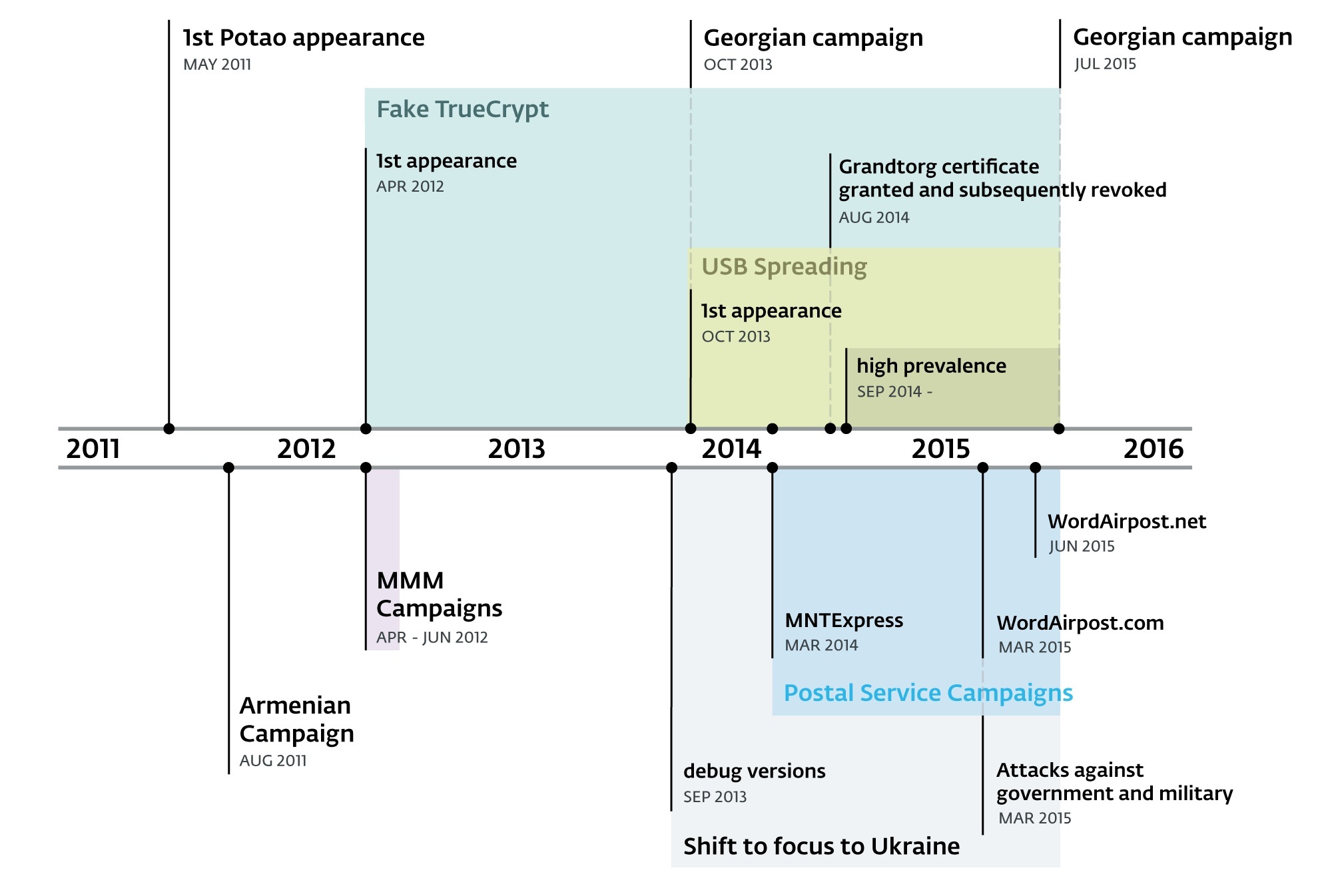
2011- July 2015
  • Aka  Sapotao and node69
  • Group - Sandworm / Quedagh APT
  • Vectors - USB, exe as doc, xls
  • Victims - RU, BY, AM, GE 
  • Victims - MMM group, UA gov
  • truecryptrussia.ru has been serving modified versions of the encryption software (Win32/FakeTC) that included a backdoor to selected targets. 
  • Win32/FakeTC - data theft from encrypted drives
  • The Potao main DLL only takes care of its core functionality; the actual spying functions are implemented in the form of downloadable modules. The plugins are downloaded each time the malware starts, since they aren't stored on the hard drive.
  • 1st Full Plugin and its export function is called Plug. Full plugins run continuously until the infected system is restarted
  • 2nd Light Plugin with an export function Scan. Light plugins terminate immediately after returning a buffer with the information they harvested off the victim's machine.
  • Some of the plugins were signed with a certificate issued to "Grandtorg":
  • Traffic 
  • Strong encryption. The data sent is encapsulated using the XML-RPC protocol.
  • MethodName value 10a7d030-1a61-11e3-beea-001c42e2a08b is always present in Potao traffic.
  • After receiving the request the C&C server generates an RSA-2048 public key and signs this generated key with another, static RSA-2048 private key .
  • In 2nd stage the malware generates a symmetric AES-256 key. This AES session key is encrypted with the newly received RSA-2048 public key and sent to the C&C server.
  • The actual data exchange after the key exchange is then encrypted using symmetric cryptography, which is faster, with the AES-256 key
  • The Potao malware sends an encrypted request to the server with computer ID, campaign ID, OS version, version of malware, computer name, current privileges, OS architecture (64 or 32bits) and also the name of the current process.
  • Potao USB - uses social engineering, exe in the root disguised as drive icon
  • Potao Anti RE -  uses the MurmurHash2 algorithm for computing the hashes of the API function names.
  • Potao Anti RE - encryption of strings
  • Russian TrueCrypt Win32/FakeTC - The malicious program code within the otherwise functional TrueCrypt software runs in its own thread. This thread, created at the end of the Mount function, enumerates files on the mounted encrypted drive, and if certain conditions are met, it connects to the C&C server, ready to execute commands from the attackers.
  • IOC https://github.com/eset/malware-ioc/tree/master/potao

TypeSHA256MD5
1stVersion1fe6af3d704d2fc0c7acd58b069a31eec866668ec6e25f52354e6e61266db8db85b0e3264820008a30f17ca19332fa19
1stVersion2ff0941fe3514abc12484ad2853d22fd7cb36469a313b5ecb6ef0c6391cf78abac854a3c91d52bfc09605506e76975ae
1stVersion54a76f5cd5a32ed7d5fa78e5d8311bafc0de57a475bc2fddc23ee4b3510b9d443b7d88a069631111d5585b1b10cccc86
1stVersion76c7c67274cf5384615a120e69be3af64cc31d9c4f05ff2031120612443c8360d1658b792dd1569abc27966083f59d44
1stVersion244c181eb442fefcf1e1daf900896bee6569481c0e885e3c63efeef86cd64c550c7183d761f15772b7e9c788be601d29
1stVersion887a721254486263f1f3f25f3c677da62ef5c062c3afa7ef70c895bc8b17b424a35e48909a49334a7ebb5448a78dcff9
1stVersion945c594aee1b5bd0f3a72abe8f5a3df74fc6ca686887db5e40fe859e3fc90bb1502f35002b1a95f1ae135baff6cff836
1stVersionab8d308fd59a8db8a130fcfdb6db56c4f7717877c465be98f71284bdfccdfa25a446ced5db1de877cf78f77741e2a804
1stVersionb22a614a291111398657cf8d1fa64fa50ed9c66c66a0b09d08c53972c6536766d939a05e1e3c9d7b6127d503c025dbc4
1stVersionfcfdcbdd60f105af1362cfeb3decbbbbe09d5fc82bde6ee8dfd846b2b844f97214634d446471b9e2f55158d9ac09d0b2
DebugVersion910f55e1c4e75696405e158e40b55238d767730c60119539b644ef3e6bc32a5d7263a328f0d47c76b4e103546b648484
DebugVersionc821cb34c86ec259af37c389a8f6cd635d98753576c675882c9896025a1abc53bdc9255df5385f534fea83b497c371c8
DebugVersionf845778c3f2e3272145621776a90f662ee9344e3ae550c76f65fd954e7277d195199fcd031987834ed3121fb316f4970
Droppersfrompostalsites4dcf14c41b31f8accf9683917bfc9159b9178d6fe36227195fabc232909452af65f494580c95e10541d1f377c0a7bd49
Droppersfrompostalsites8bc189dee0a71b3a8a1767e95cc726e13808ed7d2e9546a9d6b6843cea5eb3bda4b0615cb639607e6905437dd900c059
Droppersfrompostalsites048621ecf8f25133b2b09d512bb0fe15fc274ec7cb2ccc966aeb44d7a88beb5b07e99b2f572b84af5c4504c23f1653bb
Droppersfrompostalsitesaa23a93d2fed81daacb93ea7ad633426e04fcd063ff2ea6c0af5649c6cfa03851927a80cd45f0d27b1ae034c11ddedb0
Droppersfrompostalsitesc66955f667e9045ea5591ebf9b59246ad86227f174ea817d1398815a292b8c88579ad4a596602a10b7cf4659b6b6909d
Droppersfrompostalsitesd6f126ab387f1d856672c730991573385c5746c7c84738ab97b13c897063ff4ae64eb8b571f655b744c9154d8032caef
Dropperswdecoy61dd8b60ac35e91771d9ed4f337cd63e0aa6d0a0c5a17bb28cac59b3c21c24a9d755e52ba5658a639c778c22d1a906a3
Dropperswdecoy4328b06093a4ad01f828dc837053cb058fe00f3a7fd5cfb9d1ff7feb7ebb8e32b4d909077aa25f31386722e716a5305c
Dropperswdecoy15760f0979f2ba1b4d991f19e8b59fc1e61632fcc88755a4d147c0f5d47965c5fc4b285088413127b6d827656b9d0481
Dropperswdecoyb9c285f485421177e616a148410ddc5b02e43f0af375d3141b7e829f7d487bfd73e7ee83133a175b815059f1af79ab1b
Dropperswdecoycf3b0d8e9a7d0ad32351ade0c52de583b5ca2f72e5af4adbf638c81f4ad8fbcbeebbcb1ed5f5606aec296168dee39166
Dropperswdecoydbc1b98b1df1d9c2dc8a5635682ed44a91df6359264ed63370724afa9f19c7ee5a24a7370f35dbdbb81adf52e769a442
FakeTrueCryptextractedexe4c01ffcc90e6271374b34b252fefb5d6fffda29f6ad645a879a159f78e095979b64dbe5817b24d17a0404e9b2606ad96
FakeTrueCryptextractedexe5de8c04a77e37dc1860da490453085506f8aa378fbc7d811128694d8581b89ba7ca6101c2ae4838fbbd7ceb0b2354e43
FakeTrueCryptextractedexe73aae05fab96290cabbe4b0ec561d2f6d79da71834509c4b1f4b9ae714159b42f64704ed25f4c728af996eee3ee85411
FakeTrueCryptextractedexec7212d249b5eb7e2cea948a173ce96e1d2b8c44dcc2bb1d101dce64bb3f5beccc1f715ff0afc78af81d215d485cc235c
FakeTrueCryptSetup42028874fae37ad9dc89eb37149ecb1e6439869918309a07f056924c1b981deff34b77f7b2233ee6f727d59fb28f438a
FakeTrueCryptSetupa3a43bbc69e24c0bc3ab06fbf3ccc35cf8687e2862f86fb0d269258b68c710c9babd17701cbe876149dc07e68ec7ca4f
FakeTrueCryptSetupb8844e5b72971fe67d2905e77ddaa3366ae1c3bead92be6effd58691bc1ff8eccfc8901fe6a9a8299087bfc73ae8909e
FakeTrueCryptSetupfe3547f0e052c71f872bf09cdc1654137ee68f878fc6d5a78df16a13e6de176883f3ec97a95595ebe40a75e94c98a7bd
OtherDroppers2de76a3c07344ce322151dbb42febdff97ade8176466a3af07e5280bd859a18638e708fea8016520cb25d3cb933f2244
OtherDroppers4e88b8b121d768c611fe16ae1f008502b2191edc6f2ee84fef7b12b4d86fe000360df4c2f2b99052c07e08edbe15ab2c
OtherDroppers29dfc81b400a1400782623c618cb1d507f5d17bb13de44f123a333093648048f89a3ea3967745e04199ebf222494452e
OtherDroppers97afe4b12a9fed40ad20ab191ba0a577f5a46cbfb307e118a7ae69d04adc2e2d6ba88e8e74b12c914483c026ae92eb42
OtherDroppers793a8ce811f423dfde47a5f44ae50e19e7e41ad055e56c7345927eac951e966b043f99a875424ca0023a21739dba51ef
OtherDroppers904bb2efe661f654425e691b7748556e558a636d4f25c43af9d2d4dfbe83262e02d438df779affddaf02ca995c60cecb
OtherDroppersb62589ee5ba94d15edcf8613e3d57255dd7a12fce6d2dbd660fd7281ce6234f411b4e7ea6bae19a29343ae3ff3fb00ca
OtherDroppersd2c11706736fda2b178ac388206472fd8d050e0f13568c84b37683423acd155d27d74523b182ae630c4e5236897e11f3
OtherDroppersf1f61a0f9488be3925665f8063006f90fab1bf0bd0b6ff5f7799f8995ff8960e1ab8d45656e245aca4e59aa0519f6ba0
USBSpreaders1acae7c11fb559b81df5fc6d0df0fe502e87f674ca9f4aefc2d7d8f828ba7f5c76dda7ca15323fd658054e0550149b7b
USBSpreaders3d78f52fa0c08d8bf3d42074bf76ee56aa233fb9a6bc76119998d085d94368caca1a3618088f91b8fb2a30c9a9aa4aca
USBSpreaders7d15bd854c1dfef847cdd3caabdf4ab81f2410ee5c7f91d377cc72eb81135ff4a2bb01b764491dd61fa3a7ba5afc709c
USBSpreaders09c04206b57bb8582faffb37e4ebb6867a02492ffc08268bcbc717708d1a8919a59053cc3f66e72540634eb7895824ac
USBSpreaders12bb18fa9a12cb89dea3733b342940b80cd453886390079cb4c2ffcd664baeda2bd0d2b5ee4e93717ea71445b102e38e
USBSpreaders34e6fb074284e58ca80961feda4fe651d6d658077914a528a4a6efa91ecc749d057028e46ea797834da401e4db7c860a
USBSpreaders90b20b1687909c2f76f750ba3fd4b14731ce736c08c3a8608d28eae3f4cd68f3514423670de210f13092d6cb8916748e
USBSpreaders93accb71bf4e776955756c76990298decfebe4b1dd9fbf9d368e81dc1cb9532dabb9f4fab64dd7a03574abdd1076b5ea
USBSpreaders99a09ad92cc1a2564f3051057383cb6268893bc4a62903eabf3538c6bfb3aa9c542b00f903f945ad3a9291cb0af73446
USBSpreaders339a5199e6d0b5f781b08b2ca0ad0495e75e52b8e2fd69e1d970388fbca7a0d6a427ff7abb17af6cf5fb70c49e9bf4e1
USBSpreaders340b09d661a6ac45af53c348a5c1846ad6323d34311e66454e46c1d38d53af8b2646f7159e1723f089d63e08c8bfaffb
USBSpreaders461dd5a58ffcad9fffba9181e234f2e0149c8b8ba28c7ea53753c74fdfa0b0d5609abb2a86c324bbb9ba1e253595e573
USBSpreaders4688afcc161603bfa1c997b6d71b9618be96f9ff980e5486c451b1cc2c5076cbae552fc43f1ba8684655d8bf8c6af869
USBSpreaders7492e84a30e890ebe3ca5140ad547965cc8c43f0a02f66be153b038a73ee53141234bf4f0f5debc800d85c1bd2255671
USBSpreaders61862a55dcf8212ce9dd4a8f0c92447a6c7093681c592eb937a247e38c8109d4e685ea8b37f707f3706d7281b8f6816a
USBSpreaders95631685006ac92b7eb0755274e2a36a3c9058cf462dd46f9f4f66e8d67b9db29179f4683ece450c1ac7a819b32bdb6d
USBSpreadersb8b02cc57e45bcf500b433806e6a4f8af7f0ac0c5fc9adfd11820eebf4eb5d79cdc60eb93b594fb5e7e5895e2b441240
USBSpreaderse57eb9f7fdf3f0e90b1755d947f1fe7bb65e67308f1f4a8c25bc2946512934b739b67cc6dae5214328022c44f28ced8b
USBSpreaderse3892d2d9f87ea848477529458d025898b24a6802eb4df13e96b0314334635d03813b848162261cc5982dd64c741b450
USBSpreadersf1d7e36af4c30bf3d680c87bbc4430de282d00323bf8ae9e17b04862af28673635724e234f6258e601257fb219db9079


Related news
  1. Pentest Uk
  2. Pentesterlab
  3. Hacker Kevin Mitnick
  4. Hacker Google
  5. Hacking Health
  6. Pentest As A Service
  7. Pentest Red Team
  8. Hacker0Ne
  9. Pentest App
  10. Hacker Box
  11. Hacking Browser
  12. Rapid7 Pentest
  13. Pentest Services

Sslmerge - Tool To Help You Build A Valid SSL Certificate Chain From The Root Certificate To The End-User Certificate


Is an open source tool to help you build a valid SSL certificate chain from the root certificate to the end-user certificate. Also can help you fix the incomplete certificate chain and download all missing CA certificates.

How To Use
It's simple:
# Clone this repository
git clone https://github.com/trimstray/sslmerge

# Go into the repository
cd sslmerge

# Install
./setup.sh install

# Run the app
sslmerge -i /data/certs -o /data/certs/chain.crt
  • symlink to bin/sslmerge is placed in /usr/local/bin
  • man page is placed in /usr/local/man/man8

Parameters
Provides the following options:
  Usage:
sslmerge <option|long-option>

Examples:
sslmerge --in Root.crt --in Intermediate1.crt --in Server.crt --out bundle_chain_certs.crt
sslmerge --in /tmp/certs --out bundle_chain_certs.crt --with-root
sslmerge -i Server.crt -o bundle_chain_certs.crt

Options:
--help show this message
--debug displays information on the screen (debug mode)
-i, --in add certificates to merge (certificate file, multiple files or directory with ssl certificates)
-o, --out saves the result (chain) to file
--with-root add root certificate to the certificate chain

How it works
Let's start with ssllabs certificate chain. They are delivered together with the sslmerge and can be found in the example/ssllabs.com directory which additionally contains the all directory (containing all the certificates needed to assemble the chain) and the server_certificate directory (containing only the server certificate).
The correct chain for the ssllabs.com domain (the result of the openssl command):
Certificate chain
0 s:/C=US/ST=California/L=Redwood City/O=Qualys, Inc./CN=ssllabs.com
i:/C=US/O=Entrust, Inc./OU=See www.entrust.net/legal-terms/OU=(c) 2012 Entrust, Inc. - for authorized use only/CN=Entrust Certification Authority - L1K
1 s:/C=US/O=Entrust, Inc./OU=See www.entrust.net/legal-terms/OU=(c) 2012 Entrust, Inc. - for authorized use only/CN=Entrust Certification Authority - L1K
i:/C=US/O=Entrust, Inc./OU=See www.entrust.net/legal-terms/OU=(c) 2009 Entrust, Inc. - for authorized use only/CN=Entrust Root Certification Authority - G2
2 s:/C=US/O=Entrust, Inc./OU=See www.entrust.net/legal-terms/OU=(c) 2009 Entrust, Inc. - for authorized use only/CN=Entrust Root Certification Authority - G2
i:/C=US/O=Entrust, Inc./OU=www.entrust.net/CPS is incorporated by reference/OU=(c) 2006 Entrust, Inc./CN=Entrust Root Certification Authority
The above code presents a full chain consisting of:
  • Identity Certificate (Server Certificate)
    issued for ssllabs.com by Entrust Certification Authority - L1K
  • Intermediate Certificate
    issued for Entrust Certification Authority - L1K by Entrust Root Certification Authority - G2
  • Intermediate Certificate
    issued for Entrust Root Certification Authority - G2 by Entrust Root Certification Authority
  • Root Certificate (Self-Signed Certificate)
    issued for Entrust Root Certification Authority by Entrust Root Certification Authority

Scenario 1
In this scenario, we will chain all delivered certificates. Example of running the tool:

Scenario 2
In this scenario, we only use the server certificate and use it to retrieve the remaining required certificates. Then, as above, we will combine all the provided certificates. Example of running the tool:

Certificate chain
In order to create a valid chain, you must provide the tool with all the necessary certificates. It will be:
  • Server Certificate
  • Intermediate CAs and Root CAs
This is very important because without it you will not be able to determine the beginning and end of the chain.
However, if you look inside the generated chain after generating with sslmerge, you will not find the root certificate there. Why?
Because self-signed root certificates need not/should not be included in web server configuration. They serve no purpose (clients will always ignore them) and they incur a slight performance (latency) penalty because they increase the size of the SSL handshake.
If you want to add a root certificate to the certificate chain, call the utility with the --with-root parameter.

Certification Paths
Sslmerge allows use of two certification paths:

Output comments
When generating the chain of certificates, sslmerge displays comments with information about certificates, including any errors.
Here is a list of all possibilities:

not found identity (end-user, server) certificate
The message is displayed in the absence of a server certificate that is the beginning of the chain. This is a unique case because in this situation the sslmerge ends its operation displaying only this information. The server certificate is the only certificate required to correctly create a chain. Without this certificate, the correct chain will not be created.

found correct identity (end-user, server) certificate
The reverse situation here - message displayed when a valid server certificate is found.

not found first intermediate certificate
This message appears when the first of the two intermediate certificates is not found. This information does not explicitly specify the absence of a second intermediate certificate and on the other hand it allows to determine whether the intermediate certificate to which the server certificate was signed exists. Additionally, it can be displayed if the second intermediate certificate has been delivered.

not found second intermediate certificate
Similar to the above, however, it concerns the second intermediate certificate. However, it is possible to create the chain correctly using the second certification path, e.g. using the first intermediate certificate and replacing the second with the main certificate.

one or more intermediate certificate not found
This message means that one or all of the required intermediate certificates are missing and displayed in the absence of the root certificate.

found 'n' correct intermediate certificate(s)
This message indicates the number of valid intermediate certificates.

not found correct root certificate
The lack of the root certificate is treated as a warning. Of course, when configuring certificates on the server side, it is not recommended to attach a root certificate, but if you create it with the sslmerge, it treats the chain as incomplete displaying information about the incorrect creation of the chain.

an empty CN field was found in one of the certificates
This message does not inform about the error and about the lack of the CN field what can happen with some certificates (look at example/google.com). Common Name field identifies the host name associated with the certificate. There is no requirement in RFC3280 for an Issuer DN to have a CN. Most CAs do include a CN in the Issuer DN, but some don't, such as this Equifax CA.

Requirements
Sslmerge uses external utilities to be installed before running:

Other

Contributing
See this.

Project architecture
See this.


Continue reading


  1. Pentestmonkey Cheat Sheet
  2. Hacking With Raspberry Pi
  3. Hacking Bluetooth
  4. Hacker Types
  5. Pentest Report Generator
  6. Hacker News
  7. Pentest Stages
  8. Pentestgeek
  9. Hacker News
  10. Hacking Quotes
  11. Pentest Os
  12. Pentest Tutorial
  13. Pentest Guide
  14. Hacking With Linux
  15. Pentest Uk
  16. Hacker Computer

C++ Std::Condition_Variable Null Pointer Derreference


This story is about a bug generated by g++ and clang compilers (at least)
The condition_variables is a feature on the standard library of c++ (libstdc++), when its compiled statically a weird asm code is generated.


Any example on the link below will crash if its compiled statically:
 https://en.cppreference.com/w/cpp/thread/condition_variable


In this case the condition_variable.wait() crashed, but this happens with other methods, a simple way to trigger it:


If this program is compiled dynamically the crash doesn't occur:

Looking the dissasembly there is a surprise created by the compiler:


Compilers:
    g++  9.2.1+20200130-2
    clang++ v9

Both compilers are generating the "call 0x00"

If we check this call in a dynamic compiled:


The implementation of condition_variable in github:
https://github.com/gcc-mirror/gcc/blob/b7c9bd36eaacac42631b882dc67a6f0db94de21c/libstdc%2B%2B-v3/include/std/condition_variable


The compilers can't copile well this code in static,  and same happens on  other condition_variable methods.
I would say the _lock is being assembled improperly in static, is not exacly a null pointer derreference but the effects are the same, executing code at address 0x00 which on linux is a crash on most of cases.

Related posts


Memcrashed DDoS Exploit | Install | Github

Continue reading

  1. Pentest+ Vs Oscp
  2. Hacking Hardware
  3. Hacker0Ne
  4. Pentest Basics
  5. Hacking Online Games
  6. Hackerone
  7. Pentest Tutorial
  8. Pentesterlab
  9. Hackintosh
  10. Pentest Ubuntu
  11. Pentest Linux
  12. Hacking Link
  13. Pentest Red Team
  14. Hacking Jailbreak
  15. Pentest Wiki
  16. Hacking Websites
  17. Pentest Gear
  18. Pentestgeek
  19. Pentest Active Directory
  20. Rapid7 Pentest